

An AI audio summarizer is software that automatically transcribes spoken audio into text and generates concise, structured summaries from that text. These tools combine Whisper-class speech-to-text engines with large language models to produce organized output in seconds. Top-tier services reach up to 99% accuracy on clean recordings, making them genuinely useful for students reviewing lectures and professionals processing meeting recordings. Voicemint applies this same pipeline to deliver ready-to-use documents without any manual formatting on your part.
How does an AI audio summarizer work?
Audio summarization is a two-stage process: transcription first, then summarization. Each stage uses a different AI model, and the quality of the first stage directly determines the quality of the second.
The transcription stage
A Whisper-class engine converts your audio file into a raw text transcript. AI speech-to-text processes audio roughly 30 times faster than real time, so a one-hour lecture produces a transcript in about two minutes. The engine handles common audio formats including MP3, WAV, and MP4, and leading tools support 51 languages with automatic language detection.

Real-world accuracy drops from the 99% benchmark when audio conditions are less than ideal. Background noise, overlapping speakers, and strong accents all reduce accuracy to approximately 90% in typical environments. That gap matters when you are reviewing a noisy conference recording or a group discussion with multiple voices.
Speaker diarization addresses the multi-speaker problem directly. The engine identifies and labels speakers by assigning each voice a number or a name, so the transcript reads like a formatted dialogue rather than a wall of undifferentiated text. This feature is especially useful for interview recordings, panel discussions, and team meetings.
The summarization stage
Once the transcript exists, a large language model reads it and generates a summary. Long recordings require an extra step called semantic chunking. The model splits the transcript at natural topic boundaries, summarizes each chunk independently, then merges those summaries into a single coherent document. This map-reduce pipeline prevents the model from losing context in recordings that run for several hours.
- Semantic chunking detects topic shifts so each section of the summary maps to a distinct part of the recording.
- Map-reduce summarization processes chunks in parallel, which keeps turnaround time short even for large files.
- Language model output organizes the summary into headings, bullet points, and key takeaways automatically.
Pro Tip: Upload the cleanest version of your audio file available. Even a modest improvement in recording quality, such as using a directional microphone or recording in a quiet room, can push real-world accuracy noticeably closer to the 99% benchmark.
What output formats do audio summarizers produce?
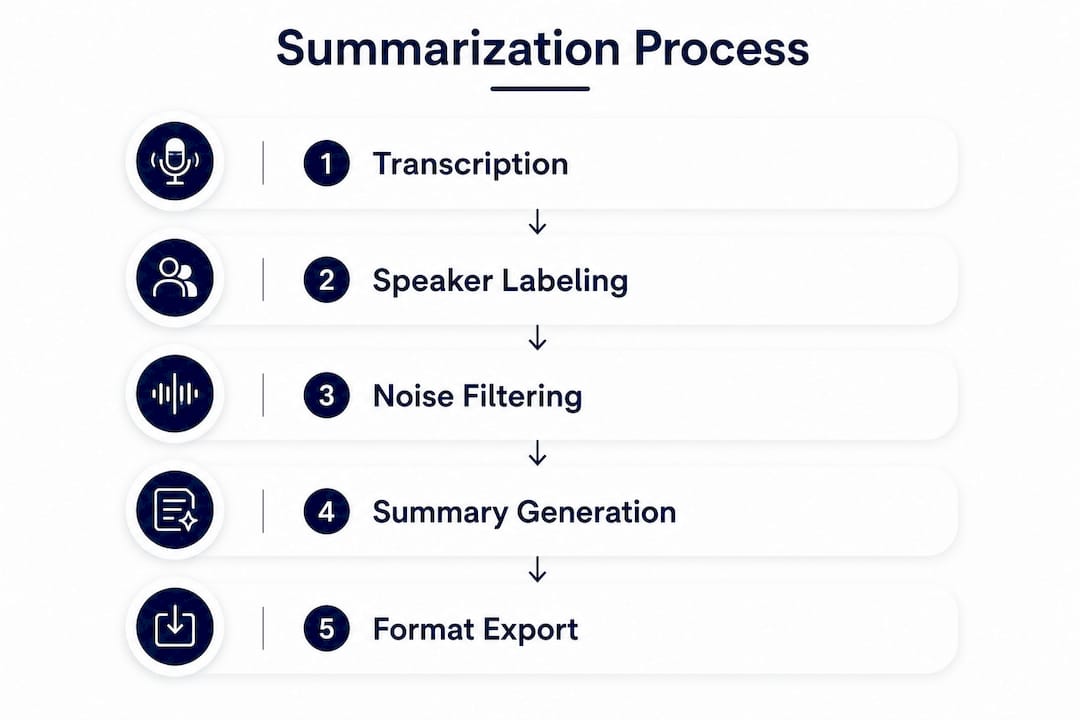
The summary itself is only as useful as the format it arrives in. A well-designed audio file summarizer gives you multiple output types so you can match the result to your workflow.
Summary presets
Most tools offer several summary modes. A quick summary condenses a one-hour recording into a few paragraphs. A detailed breakdown preserves section-by-section structure. Key takeaways pull the most important points into a short bulleted list. A full transcript with highlights gives you the complete text plus annotations.
Choosing the right preset matters. A 90-minute sales call benefits from a structured report with action items. A 45-minute lecture benefits from an outline with definitions highlighted. Using the wrong preset forces you to reformat the output manually, which defeats the purpose.
Export formats
Structured output templates for meetings, lectures, and sales calls significantly reduce the time you spend reformatting notes. The three most common export formats are:
- Markdown works directly in note-taking apps like Obsidian and Notion, preserving headings and bullet structure.
- DOCX opens in Microsoft Word or Google Docs for further editing and sharing.
- Plain text offers maximum flexibility for pasting into any app or custom workflow.
Voicemint delivers output as a formatted document the moment processing finishes. You download a file that is ready to use, not a raw text dump that requires cleanup.
Pro Tip: Match your export format to your destination. If you paste notes into Notion, choose Markdown. If you share summaries with colleagues via email, choose DOCX. Picking the right format at export saves you a formatting step later.
What are the accuracy limits of AI audio summarizers?
Accuracy is the most misunderstood aspect of audio summarization. The 99% figure that appears in marketing materials applies specifically to clean, single-speaker audio recorded in a quiet environment. Real-world conditions produce approximately 90% accuracy due to background noise, overlapping voices, and diverse accents.
A 10% error rate sounds small, but in a 10,000-word transcript it means roughly 1,000 incorrect words. For casual note-taking, that level of error is acceptable. For legal depositions, medical dictation, or financial reporting, it is not.
Common accuracy problems include:
- Background noise from air conditioning, traffic, or crowd sounds degrades word recognition significantly.
- Speaker overlap confuses the diarization engine and produces merged or misattributed dialogue.
- Strong regional accents reduce recognition rates, particularly for languages with many regional variants.
- Technical vocabulary in specialized fields like medicine or law requires custom vocabulary lists to transcribe correctly.
Manual review remains essential for any documentation where errors carry legal or medical consequences. Treat AI output as a first draft, not a final record, in those contexts.
File size limits also constrain free tools. Free tiers typically cap files at 100 MB and 30 minutes of audio. Professional tiers extend those limits to 5 GB and 10 hours, which covers multi-session recordings and full-day conferences. If you regularly process long recordings, a free tier will become a bottleneck quickly.
How do students and professionals use audio summarizers in practice?
The most effective workflows treat audio summarization as a step in a larger note-taking system, not a replacement for thinking. Here is how that looks across common use cases.
- Record or upload your audio. Capture a lecture, meeting, podcast, or interview. Upload the file directly, or paste a URL if the tool supports web audio.
- Select your summary type. Choose a preset that matches the content. Lectures work well with outline-style summaries. Meetings work well with action-item reports.
- Review the transcript for critical terms. Scan the raw transcript for any proper nouns, technical terms, or figures that the AI may have misread. Correct those before relying on the summary.
- Export in your preferred format. Send the document to your note-taking app, share it with teammates, or archive it for later reference.
- Integrate with your existing tools. Paste Markdown output into Notion or Obsidian. Attach DOCX files to project management threads in Slack or Asana.
Students benefit most from lecture summarization. A two-hour seminar produces a structured outline in minutes, which leaves more time for active review rather than passive transcription. Professionals benefit most from meeting summaries. A 60-minute team call becomes a one-page action-item list that everyone can reference without rewatching a recording.
Multi-hour recordings require attention to file limits. Free summarizers often cap duration at 10–30 minutes, which excludes full-day workshops or multi-hour interviews. Professional tiers handle those files without interruption.
Pro Tip: For multi-hour recordings, split the file into logical segments before uploading if your tool has duration limits. Label each segment by topic so the exported summaries stay organized when you combine them.
Key Takeaways
An AI audio summarizer delivers the most value when you match its output format and summary type to your specific use case and verify the transcript for high-stakes content.
| Point | Details |
|---|---|
| Accuracy varies by environment | Clean audio reaches 99% accuracy; noisy or multi-speaker recordings drop to roughly 90%. |
| Summary type selection matters | Choose outline summaries for lectures and action-item reports for meetings to avoid manual reformatting. |
| Export format affects usability | Markdown suits note-taking apps; DOCX suits shared editing; plain text suits flexible workflows. |
| Free tiers have real limits | Most free tools cap files at 100 MB and 30 minutes, which excludes longer recordings. |
| Human review is required for critical content | Legal, medical, and financial documentation always needs a manual verification step. |
Why I think most people underuse these tools
Most students and professionals I have observed treat audio summarization as a transcription service. They upload a file, download the transcript, and stop there. That approach captures maybe 30% of the value these tools actually offer.
The real gain comes from structured output. A raw transcript is just a wall of text. A structured summary with headings, bullet points, and labeled speakers is a document you can act on immediately. The difference between those two outputs is not minor. It is the difference between spending 20 minutes reformatting notes and spending zero minutes doing it.
I have also noticed that people underestimate how much audio quality affects results. A $30 USB microphone in a quiet room consistently outperforms a $500 laptop microphone in a noisy café. The AI cannot fix bad input. Improving your recording setup is the single highest-return change you can make before touching any software setting.
The accuracy ceiling of approximately 90% in real-world conditions is not a flaw to work around. It is a design constraint to plan for. Build a quick review step into your workflow for anything that matters, and treat the AI output as a strong first draft. That mindset shift makes these tools genuinely reliable rather than occasionally frustrating.
The tools are improving fast. Multi-language support, speaker diarization, and custom vocabulary features that required enterprise contracts two years ago now appear in standard tiers. The gap between what free tools offer and what professional tools offer is narrowing. If you tried an audio summarizer a year ago and found it lacking, the current generation is worth another look.
— andrea
Voicemint turns your audio into organized documents instantly
Voicemint processes your recordings and produces structured, formatted documents in seconds. You record, upload, or paste your content, and the platform identifies key concepts, organizes them into headings and bullet points, and delivers a ready-to-use file.
No manual formatting. No reformatting after export. Students use Voicemint to convert lecture recordings into study-ready outlines. Professionals use it to turn meeting audio into shareable reports. The output arrives as a clean document, not a raw text file. If you want to spend less time on notes and more time on the work that matters, try Voicemint and see how fast your next recording becomes a finished document.
FAQ
What is an AI audio summarizer?
An AI audio summarizer is software that transcribes spoken audio into text and then uses a language model to generate a concise, structured summary. The output typically includes headings, bullet points, and key takeaways.
How accurate are AI audio summarizers?
Top tools reach up to 99% accuracy on clean, single-speaker audio. Real-world conditions with background noise or multiple speakers reduce accuracy to approximately 90%.
Can AI summarizers handle long recordings?
Professional tiers support files up to 5 GB and 10 hours of audio using semantic chunking and map-reduce summarization. Free tiers typically limit files to 100 MB and 30 minutes.
What file formats do audio summarizers accept?
Most tools accept MP3, WAV, and MP4 files. Leading services also support direct URL input for web-hosted audio and video content.
Do I need to review the AI-generated summary?
For casual note-taking, AI output is reliable enough to use directly. For legal, medical, or financial documentation, manual review is always required to catch errors from noise or speaker overlap.